Feature Profiles - System
Overview
Section titled “Overview”In Cisco SD-WAN Manager (vManage) UX 2.0, configuration is modular:
| Concept | Description |
|---|---|
| System Feature Profile | A container (envelope) that groups all system-level settings for a device. |
| Feature Parcel | An individual, typed block of configuration (AAA, Banner, NTP, etc.) that lives inside a System Feature Profile. |
You must create the profile first, then attach one or more parcels to it.
Workflow overview
Section titled “Workflow overview”STEP1: create system feature profile:
POST /v1/feature-profile/sdwan/systemReturns System Idenfifier (profileId).
STEP2: create parcels using the returned systemId
POST `/v1/feature-profile/sdwan/system/<profileId>/<parcel-type>`return Parcel Identifier.
Then the newly created System Feature Profile can be used in a Configuration Group.
Create System Feature Profile
Section titled “Create System Feature Profile”POST v1/feature-profile/sdwan/systemRequest Body
{ "name": "My_System_Profile", "description": "System profile for branch routers"}Response (HTTP 200)
{ "id": "aaaa-bbbb-cccc-dddd"}Example:
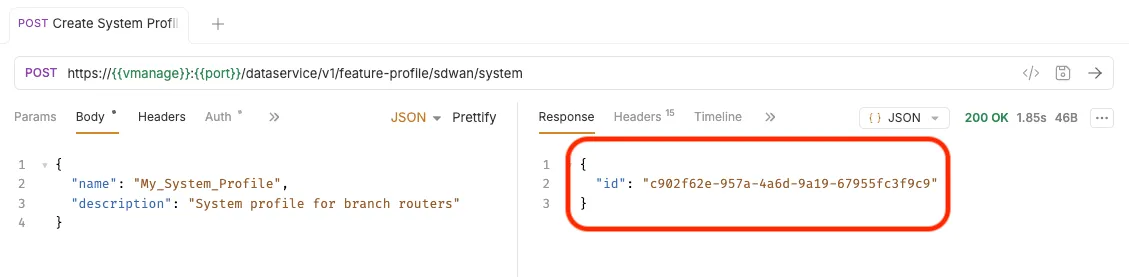
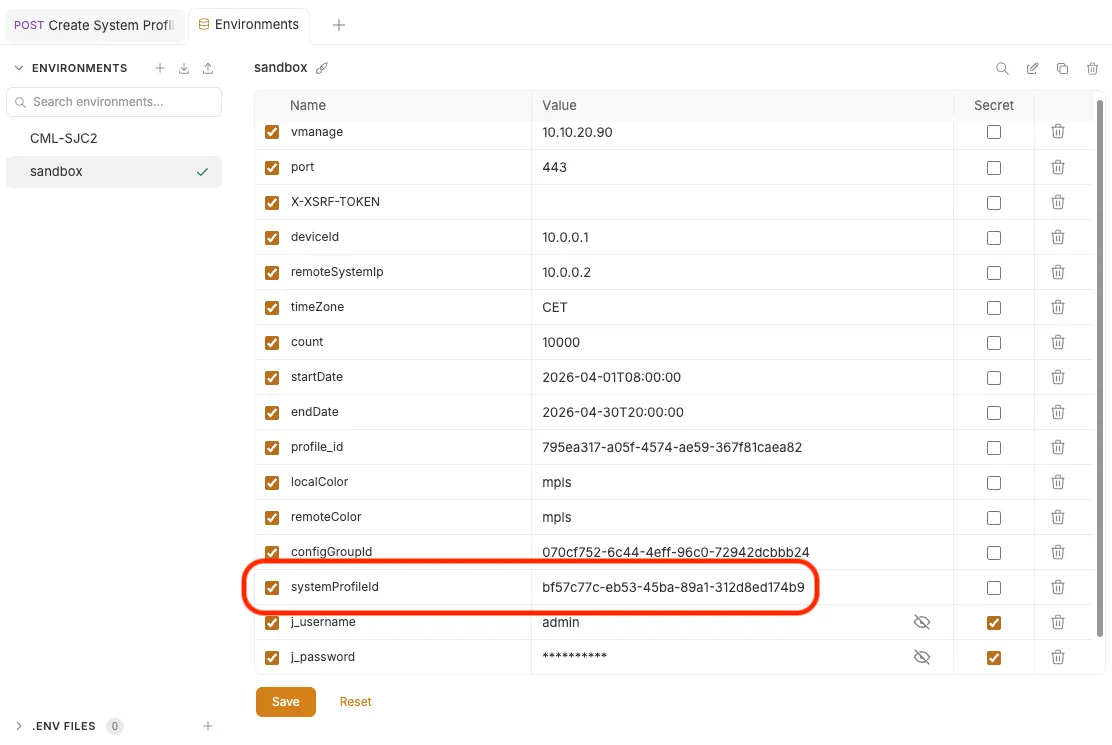
Save this profileId in a variable:
- Go to Environment (top right button “sandbox”) and select “Configure”
- This will open a panel with all your environment variables.
- Put the Profile Id in the
systemProfileIdvariable.
Create Feature Parcels
Section titled “Create Feature Parcels”With the profileId in hand, create each parcel you need.
| Item | Value |
|---|---|
| Method | POST |
| Endpoint pattern | /v1/feature-profile/sdwan/system/<profileId>/<parcel-type> |
| Content-Type | application/json |
Order does not matter. Parcels are independent of one another and can be created in any sequence.
Parcel Quick-Reference Table:
| # | Parcel Type | Endpoint Suffix | Example Required / Key Fields |
|---|---|---|---|
| 1 | AAA | /aaa |
users, … |
| 2 | Banner | /banner |
login, motd, … |
| 3 | Basic | /basic |
timezone, gpsLocation, … |
| 4 | BFD | /bfd |
multiplier, poll interval, default Dscp, colors, … |
| 5 | Global | /global |
http server, http Authentication, nat type`, … |
| 6 | Logging | /logging |
log rotation`, max size, Server, … |
| 7 | MRF | /mrf |
role, migration mode, secondary region |
| 8 | NTP | /ntp |
servers, authenticate servers, trusted keys |
| 9 | OMP | /omp |
graceful restart, send path limit, ecmp limit, advertised routes |
| 10 | Security | /security |
rekey, extended anti replay window, integrity type, pairwiseKeying |
| 11 | SNMP | /snmp |
shutdown, contact, location, community, trap |
| 12 | Ignition | /ignition |
device params |
Example — Create an NTP Parcel:
POST /dataservice/v1/feature-profile/sdwan/system/<profileId>/ntpContent-Type: application/json{ "name": "Branch_NTP", "description": "NTP settings for branch routers", "data": { "server": { "optionType": "global", "value": [ { "name": { "optionType": "global", "value": "10.0.0.1" }, "prefer": { "optionType": "global", "value": true }, "version": { "optionType": "default", "value": 4 }, "vpn": { "optionType": "global", "value": 0 } } ] } }}Response (HTTP 200)
{ "parcelId": "1111-2222-3333-4444"}The returned
parcelIdis needed if you later want to update or delete this specific parcel.
The optionType Pattern
Section titled “The optionType Pattern”Almost every field in a parcel body uses a discriminated value wrapper:
optionType |
Meaning | Example |
|---|---|---|
global |
Explicitly set by the administrator. | { "optionType": "global", "value": 3 } |
variable |
Bound to a template variable; resolved at device attach. | { "optionType": "variable", "value": "<ntp_server>" } |
default |
Use the system-defined default. Value may be present but is informational. | { "optionType": "default", "value": 4 } |
Manage parcels
Section titled “Manage parcels”| Action | Method & Endpoint |
|---|---|
| Read All Parcels of a Given Type | GET /v1/feature-profile/sdwan/system/<profileId>/<parcel-type> |
| Read a Single Parcel | GET /v1/feature-profile/sdwan/system/<profileId>/<parcel-type>/{parcelId} |
| Update a Parcel (send full payload) | PUT /v1/feature-profile/sdwan/system/<profileId>/<parcel-type>/{parcelId} |
| Delete a Parcel | DELETE /v1/feature-profile/sdwan/system/<profileId>/<parcel-type>/{parcelId} |
Manage Profile
Section titled “Manage Profile”| Action | Method & Endpoint |
|---|---|
| List all System Profiles | GET /v1/feature-profile/sdwan/system |
| Get one profile | GET /v1/feature-profile/sdwan/system/<profileId> |
| Update profile metadata | PUT /v1/feature-profile/sdwan/system/<profileId> |
| Delete a profile | DELETE /v1/feature-profile/sdwan/system/<profileId> |
HTTP Response Codes
Section titled “HTTP Response Codes”| Code | Meaning |
|---|---|
200 |
Success — resource created / retrieved / updated / deleted |
400 |
Bad request — invalid or missing fields |
401 |
Unauthorised — missing or expired session |
403 |
Forbidden — insufficient RBAC privileges |
404 |
Not found — invalid {systemId} or {parcelId} |
500 |
Internal server error |
Practice with Bruno
Section titled “Practice with Bruno”Bruno is a lightweight, offline-first API client (similar to Postman) that organises requests into collections — folders of .bru files stored directly on disk alongside your project.
Open Bruno and load the collection “Catalyst SD-WAN Sandbox” located in the bruno/sdwan-sandbox folder of this repository. The collection is already structured with all the requests needed for this lab, grouped into subfolders by workflow (e.g. Authentication, Create system profile).
Bruno uses environments to manage sets of variables (base URL, credentials, token values, IDs, etc.) that are shared across all requests in a collection. Each request references variables with the {{variable_name}} syntax — for example, {{vmanage}} for the Manager hostname, or {{systemProfileId}} for the profile ID returned after the first API call. This means you only need to set a value once in the environment and every request that uses it is automatically updated.
Before running any request, select the sandbox environment from the environment picker (top-right dropdown). This loads all the pre-configured variables for the lab sandbox.
As you work through the steps below, you will occasionally need to copy a value from a response (such as a profileId) and paste it into the environment so that subsequent requests can use it automatically. To edit environment variables: click the environment name → Configure.
Step1: Make sure you are authenticated with SD-WAN Manager:
- go to
Authenticationfolder - use
01 - Get Auth Tokenrequest, hit send
Step2: Create System Profile
- Go to
Create system profilefolder - use
01 - Create System Profileand hit send - This creates a System Profile
- Response payload contains the profile-id
- The post-response script automatically saves the value to the environment variable
systemProfileId
Step3 - Create system parcels
- Go to
Create system profilefolder - create all required parcels for basic configuration
- Requires the
systemProfileIdfrom above
Steps:
- use
02 - Create System Parcel - AAAand hit send to make the request to Manager - use
03 - Create System Parcel - Basicand hit send to make the request to Manager - use
04 - Create System Parcel - BFDand hit send to make the request to Manager - use
05 - Create System Parcel - Globaland hit send to make the request to Manager - use
06 - Create System Parcel - Loggingand hit send to make the request to Manager - use
07 - Create System Parcel - OMPand hit send to make the request to Manager
Step4: List existing System Profiles
- Go to
List profilesfolder - use
List all System Profiles, hit send - read the response payload, it contains all system profiles created on Manager
Step5: Get newly created System Profile details
- Go to
List profilesfolder - use
Get System Profile details, hit send - read the response payload, it contains all parcels for the newly created system profile.
Notes & Best Practices
Section titled “Notes & Best Practices”- Create the profile before any parcel. Every parcel endpoint requires
<profileId>as a path parameter. - One parcel per type per profile. The spec exposes a single-creation endpoint per type; creating a second parcel of the same type replaces or is rejected (depending on the type).
- Use variables for values that differ per device (e.g., hostname, GPS coordinates) to keep the profile reusable.
- Idempotent updates: Use
PUTwith the full parcel body; partial patches are not supported. - Validate with a dry-run (if supported in your vManage version) before attaching the profile to a device template.
- Version compatibility: This specification targets SD-WAN Manager 20.18. Endpoint availability may differ on earlier releases.