UX 2.0
Overview
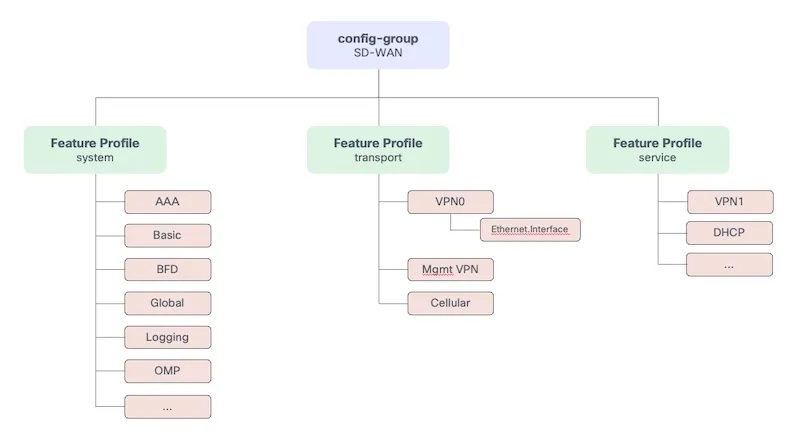
Section titled “Overview”The UX 2.0 Configuration APIs are the top-level orchestration layer in Cisco SD-WAN Manager. Configuration is hierarchical and modular: parcels sit inside feature profiles, and feature profiles are grouped inside a configuration group, which is then assigned to devices.
The three group types
Section titled “The three group types”| Group | What it does | Supported solutions |
|---|---|---|
| Configuration Group | Groups all feature profiles (System, Transport, Service, CLI) and assigns them to devices | sdwan, sd-routing, mobility, nfvirtual, service-insertion, cellulargateway |
| Policy Group | Groups policy-related profiles and assigns them to devices | sdwan, sd-routing |
| Topology Group | Defines hub-spoke or mesh topology overlays across the fabric | sdwan |
Configuration hierarchy
Section titled “Configuration hierarchy”A Configuration Group is built from four types of Feature Profile, each responsible for a different layer of device configuration:
| Feature Profile | Scope |
|---|---|
| System | System-level settings: AAA, NTP, BFD, OMP, Logging, Banner, etc. |
| Transport | Underlay connectivity: WAN interfaces, VPN 0, routing |
| Service | LAN-side services: VPN 1+, routing, policies |
| CLI | Raw CLI configuration (optional, for unsupported features) |
Each profile is populated by Feature Parcels — individual, typed configuration blocks (e.g. an NTP parcel, an AAA parcel). You create the profile first, then attach parcels to it.
Once profiles and parcels are ready, you attach the configuration group to devices and deploy:
- Associate devices to the Configuration Group
- Set per-device variables
- Preview the rendered configuration
- Deploy — returns a
parentTaskIdfor tracking
Workflow
Section titled “Workflow”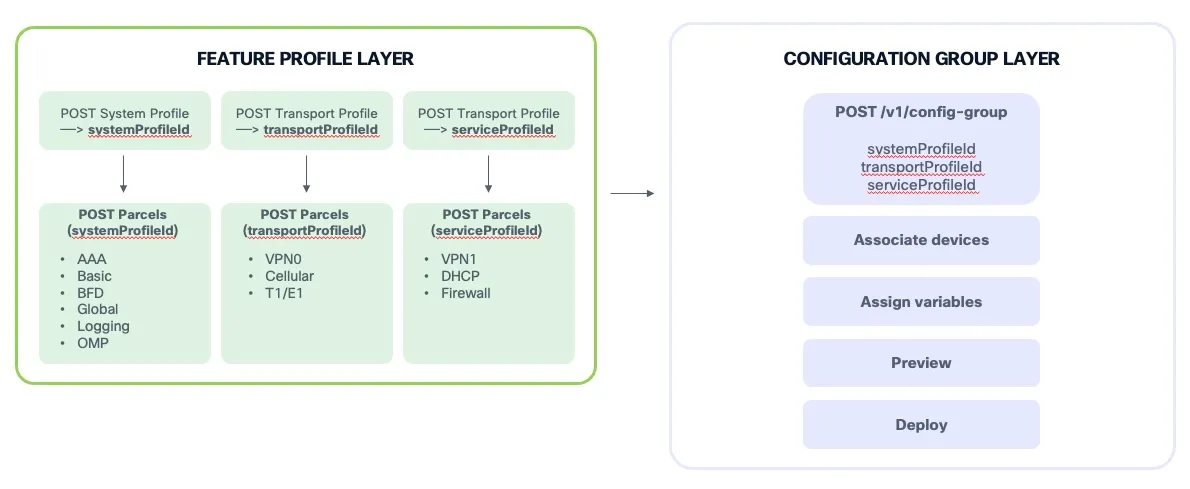
- Create a System Feature Profile → returns System Profile Identifier
- Create a Transport Feature Profile → returns Transport Profile Identifier
- Create a Service Feature Profile → returns Service Profile Identifier
- Create a CLI Feature Profile → returns CLI Profile Identifier (optional)
- Create the Feature Parcels for each Feature Profile → returns Parcel Identifier
For a System Feature Profile this would be: AAA, Banner, BFD, NTP, OMP, Logging, Global, MRF — each returning a parcelId.
Detailed Steps
Section titled “Detailed Steps”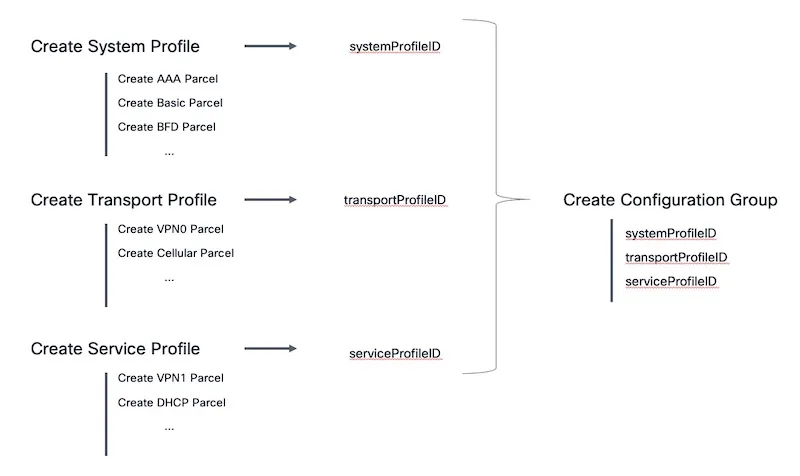
- Create Feature Profiles (System, Transport, Service…) → Returns profile UUIDs
- Create Feature Parcels under each Profile — AAA, Banner, BFD, NTP, OMP, VPN, etc.
- Create Configuration Group referencing Profile UUIDs → Returns
configGroupId - Associate Devices to the Configuration Group → Binds device UUIDs to the group
- Fetch & Assign Device Variables → Fill in per-device template variables
- (Optional) Preview Device Configuration → Returns rendered CLI/config for verification
- Deploy Configuration Group → Returns
parentTaskIdfor tracking - (Optional) Create & Deploy Policy Group
- (Optional) Create & Deploy Topology Group
- Track task:
GET /dataservice/device/action/status/{parentTaskId}
The optionType Pattern
Section titled “The optionType Pattern”Most UX 2.0 feature parcel fields use an optionType wrapper. This tells SD-WAN Manager whether the value is fixed in the parcel, left at its default, or exposed as a deploy-time variable.
optionType |
Meaning | When to use it |
|---|---|---|
global |
Store a concrete value directly in the parcel | Good for lab values or settings that should be identical on every device |
variable |
Store a variable placeholder that must be filled during device assignment/deployment | Good for production templates reused across many devices |
default |
Use the Manager/default schema value | Good when the default behavior is acceptable |
In this lab, many values use global even when they come from Bruno environment variables. That keeps the workflow simple for a single sandbox edge device: Bruno substitutes the value, Manager stores it in the parcel, and the deployment variable step only needs true device variables such as host_name, system_ip, site_id, and pseudo_commit_timer.
In production, you would usually use variable for device-specific values such as interface IP addresses, site-specific settings, and passwords. That allows the same Feature Profiles and Configuration Group to be reused across multiple devices, with each device receiving its own values during deployment.
Notes & Best Practices
Section titled “Notes & Best Practices”-
Order of operations matters:
- Create Feature Profiles & Parcels before creating the Configuration Group
- Associate devices before assigning variables
- Assign variables before deploying
-
Idempotent reads: All
GEToperations are safe to retry and can be used for polling. -
Full PUT updates: When editing a group, send the complete object — partial updates are not supported.
-
Variable completeness: Deployment will fail if required device variables are not assigned. Use the fetch endpoint (5.10.1) to discover all required variables.
-
Preview before deploy: Always preview at least one device’s config to catch errors before pushing to production.
-
Topology Groups are fabric-wide: They don’t need per-device association — they apply based on tag-based criteria.
-
Deactivation vs. Deletion: For Topology Groups, you can deactivate the topology (remove overlay) without deleting the group definition. This is useful for troubleshooting.